Are you looking for the best WordPress translation plugins for blogs and businesses? If you are, keep reading this article. Here are the top seven options to try!
Expanding your website to reach a global audience often requires more than just great content. Language barriers can prevent visitors from fully understanding your message, products, or services.

This is where WordPress translation plugins become essential. They help you translate your website into multiple languages, making it easier for international users to navigate and engage with your content.
The right translation plugin can automatically translate pages, create multilingual versions of your content, and improve accessibility for visitors from different regions. Some plugins focus on automatic translation, while others offer manual translation for greater accuracy and control.
In this article, we will explore the best WordPress translation plugins you can use to build a multilingual website and connect with a wider audience.
First, we will see what WordPress translation plugins are.
What Are WordPress Translation Plugins
WordPress translation plugins help you translate your website content into multiple languages so visitors from different regions can understand and interact with your site.
These plugins help create multilingual websites by translating pages, posts, menus, widgets, and other elements.
Some translation plugins use automatic machine translation to quickly convert content into different languages, while others allow manual translations for better accuracy and control. Many also combine both methods, letting you automatically translate content and then edit it if needed.
Using a translation plugin makes it easier to reach international audiences, improve user experience for non-English visitors, and expand your website’s global presence without creating separate websites for each language.
What to Look for In WordPress Translation Plugins
Choosing the right WordPress translation plugin is important to ensure your multilingual website runs smoothly and delivers accurate translations.
- Automatic and Manual Translation Options – Look for plugins that support both machine translation and manual editing for better accuracy.
- SEO-Friendly Translations – The plugin should ensure translated pages are indexed properly by search engines.
- Ease of Use – A user-friendly interface makes it easier to manage and edit translations without technical knowledge.
- Language Support – Choose a plugin that supports a wide range of languages for global accessibility.
- Integration Compatibility – The plugin should work well with your theme and other WordPress plugins.
Best 7 WordPress Translation Plugins to Try
| Plugin | Best For | Key Features | Author Rating |
|---|---|---|---|
| Weglot | Automatic website translation | Automatic translation, SEO-friendly URLs, language switcher, cloud-based translation management | 4.7/5 |
| Polylang | Manual multilingual websites | Unlimited languages, language switcher, custom post translation, RTL support | 4.7/5 |
| WPML | Large multilingual websites | Translation management system, WooCommerce support, manual and automatic translation | 4.6/5 |
| TranslatePress | Visual front-end translation | Translate directly from the front end, automatic and manual translation, and SEO-friendly URLs | 4.7/5 |
| GTranslate | Automatic machine translation | Google Translate integration, 100+ languages, language switcher widget | 4.9/5 |
| Loco Translate | Translating themes and plugins | In-dashboard translation editor, PO/MO file editing, localization tools | 4.8/5 |
| MultilingualPress | WordPress multisite translation | Multisite language management, separate site translations, strong performance | 4.7/5 |
Let’s take a closer look at each plugin.
1. Weglot
Weglot is a widely used WordPress translation plugin that allows you to quickly turn your website into a multilingual platform. It automatically detects and translates your website content into multiple languages, and you can manually edit translations for greater accuracy.
One of Weglot’s main advantages is its quick and simple setup process. After installing the plugin and selecting your target languages, your website can be translated within minutes.
Weglot works with posts, pages, menus, widgets, and most third-party plugins, helping ensure that your entire website is translated. It also includes multilingual SEO features such as translated URLs and hreflang tags, allowing search engines to properly index translated pages and improve international visibility.
Features
- Automatic translation with manual editing options
- Supports more than 100 languages
- Built-in multilingual SEO features
- Centralized translation dashboard
- Compatible with most WordPress themes and plugins
Pros
- Very quick and easy setup
- Automatic translation for the entire website
- Strong multilingual SEO capabilities
Cons
- Subscription-based pricing
- Costs can increase for larger websites
Pricing
Weglot is a freemium plugin with premium plans starting at €15 per month.
2. Polylang
Polylang is a popular WordPress translation plugin that allows you to create multilingual websites by translating your content into multiple languages. The plugin works directly within the WordPress dashboard, making it easy to manage translations for posts, pages, categories, tags, menus, and custom post types.
Polylang lets you assign a language to each piece of content and link translations together so visitors can switch between languages using a language switcher. It also supports SEO-friendly URLs, helping search engines properly index translated pages.
The plugin is compatible with most WordPress themes and can be extended with additional add-ons for advanced features such as WooCommerce translation. Because of its flexibility and lightweight design, Polylang is widely used for multilingual websites that rely on manual translation management.
Features
- Translate posts, pages, categories, tags, and custom post types
- Language switcher for menus and widgets
- SEO-friendly multilingual URLs
- Compatible with most WordPress themes and plugins
- Supports multiple languages without limits
Pros
- Free version available
- Lightweight and easy to manage
- Strong control over manual translations
Cons
- Some advanced features require the premium version
Pricing
Polylang is a freemium plugin with premium plans starting at €99 per year.
3. WPML
WPML is one of the most widely used WordPress translation plugins for creating multilingual websites. It allows you to translate posts, pages, custom post types, menus, and other website elements into multiple languages.
WPML includes a powerful translation management system that helps organize translation tasks and manage multilingual content efficiently. The plugin supports both manual and automatic translations, giving users flexibility depending on their workflow.
WPML is also compatible with most WordPress themes, page builders, and plugins, including WooCommerce, which makes it a reliable option for multilingual online stores.
It also includes features for translating theme and plugin text, helping ensure that every part of your website can be localized. Because of its advanced tools and flexibility, WPML is commonly used for larger or more complex multilingual websites.
Features
- Translate posts, pages, menus, and custom post types
- Translation management system for organizing translations
- Manual and automatic translation support
- Translate theme and plugin text
- Compatible with WooCommerce and popular page builders
Pros
- Powerful translation management features
- Works well with complex multilingual websites
- Strong compatibility with WordPress themes and plugins
Cons
- No free version available
- The setup can be more complex for beginners
Pricing
WPML is a premium plugin with pricing starting at €39 per year.
4. TranslatePress
TranslatePress is a popular WordPress translation plugin that allows you to translate your entire website directly from the front end. It provides a visual translation interface that lets you see your website and translate content in real time, making the process simple and intuitive.
The plugin supports both manual and automatic translations, allowing you to translate content yourself or use machine translation services when needed. TranslatePress works with posts, pages, menus, forms, and even WooCommerce products, ensuring that every part of your website can be translated.
It also integrates smoothly with most WordPress themes and plugins. With SEO-friendly translation features and a user-friendly interface, TranslatePress is a strong choice for building multilingual websites without requiring technical knowledge.
Features
- Visual front-end translation editor
- Support for manual and automatic translations
- Translate posts, pages, menus, and plugin content
- SEO-friendly multilingual URLs
- Compatible with most WordPress themes and plugins
Pros
- Easy visual translation interface
- Works with nearly all WordPress themes and plugins
- Supports both manual and automatic translation
Cons
- Some advanced features require the premium version
- Automatic translation services may require additional setup
Pricing
TranslatePress is a freemium plugin, with premium plans starting at €99 per year.
5. GTranslate
GTranslate is a WordPress translation plugin that uses Google Translate technology to automatically translate your website into multiple languages. It is designed for users who want a quick and simple way to make their website accessible to a global audience.
The plugin can translate posts, pages, menus, widgets, and other website content with minimal setup. GTranslate also includes a customizable language switcher that lets visitors easily select their preferred language.
The free version provides automatic translation using Google Translate, while the premium version adds advanced features such as SEO-friendly URLs, improved translation quality, and multilingual indexing by search engines.
Because of its automatic translation capabilities and simple configuration, GTranslate is often used by website owners seeking fast multilingual support without manual translation.
Features
- Automatic translation powered by Google Translate
- Supports more than 100 languages
- Customizable language switcher
- Translation for posts, pages, menus, and widgets
- SEO-friendly multilingual URLs in the premium version
Pros
- Very easy to set up and use
- Supports a large number of languages
- Free version available
Cons
- Machine translations may require editing for accuracy
- Advanced SEO features require the premium plan
Pricing
GTranslate is a freemium plugin with premium plans starting at $9.99 per month.
6. Loco Translate
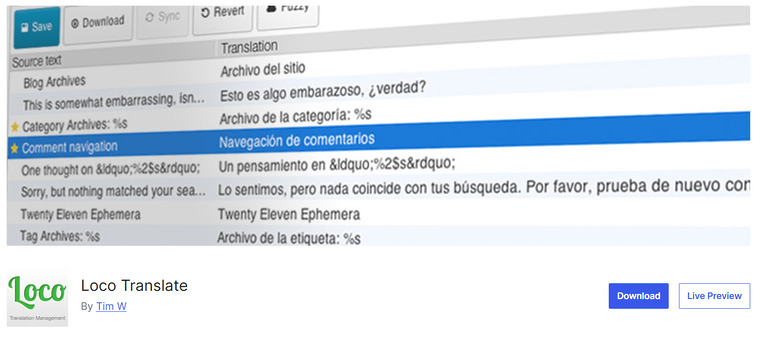
Loco Translate is a WordPress translation plugin designed primarily for translating themes and plugins directly from the WordPress dashboard. Instead of focusing on full website multilingual translation, Loco Translate helps developers and site owners localize theme and plugin text files without leaving the admin panel.
The plugin provides an in-dashboard editor that allows you to translate language files and manage translation strings easily. It supports standard localization formats such as PO and MO files, which are commonly used in WordPress development.
Loco Translate also includes built-in tools for extracting translatable strings from themes and plugins. Because of its focus on localization and file editing, Loco Translate is widely used by developers and website administrators who need to translate interface text within WordPress themes and plugins.
Features
- Translate themes and plugins directly from the dashboard
- Built-in PO and MO file editor
- Extract translatable strings from themes and plugins
- In-browser translation management tools
- Supports standard WordPress localization formats
Pros
- Ideal for translating themes and plugins
- Easy in-dashboard translation editor
- Free version available
Cons
- Not designed for full multilingual website translation
- Advanced features require the premium version
Pricing
Loco Translate is a freemium plugin with premium plans starting at £4.95 per month.
7. MultilingualPress
MultilingualPress is a WordPress translation plugin designed specifically for WordPress Multisite websites. Instead of storing all translations within a single site, the plugin creates a separate site for each language in the multisite network.
This approach improves website performance and keeps each language version independent while still connecting translated content across the network.
MultilingualPress allows you to manage translations for posts, pages, custom post types, and other site elements while maintaining control over each language site. It also includes a language switcher and tools to link translated content between sites.
Because each language runs as its own site, MultilingualPress is often preferred for large multilingual websites that require strong performance, scalability, and better separation between language versions.
Features
- Designed for WordPress Multisite environments
- Connects translated content between different language sites
- Language switcher for easy navigation
- Supports posts, pages, and custom post types
- Compatible with many WordPress themes and plugins
Pros
- Excellent performance for multilingual sites
- Ideal for large or complex websites
- Flexible management of language versions
Cons
- Requires WordPress Multisite setup
- Higher cost compared to many other translation plugins
Pricing
MultilingualPress is a freemium plugin with premium plans starting at $149 per year.
Frequently Asked Questions
Now, we can take a look at some frequently asked questions and answers about this topic.
What is the best WordPress translation plugin?
The best WordPress translation plugin depends on your specific needs. Plugins like Weglot and GTranslate are ideal for automatic translations, while Polylang and WPML are better suited for manually managing multilingual websites. If you prefer to translate content visually on the front end, TranslatePress is also a popular choice.
Do WordPress translation plugins support automatic translation?
Yes, many WordPress translation plugins support automatic translation using machine translation technology. Tools such as Weglot, TranslatePress, and GTranslate can automatically translate your website content into multiple languages, and most of them also allow you to manually edit translations for better accuracy.
Are WordPress translation plugins SEO friendly?
Many WordPress translation plugins are built with SEO features in mind. They can generate separate URLs for different languages, which allows search engines to properly index translated pages and helps improve your website’s visibility in international search results.
Can I manually edit translations with these plugins?
Yes, most translation plugins provide options for manual editing. This allows you to review machine translations and make adjustments so the content remains accurate and consistent with your brand’s voice and messaging.
Do translation plugins slow down a WordPress website?
Most modern translation plugins are optimized to maintain good performance. However, the effect on website speed can depend on the plugin you choose, the number of languages added, and whether the translations are stored locally or processed through external services.
How many languages can I add to a WordPress website?
The number of languages you can add usually depends on the plugin you are using. Many translation plugins support dozens or even hundreds of languages, making it possible to create a fully multilingual website for a global audience.
Do I need coding skills to use a WordPress translation plugin?
No, most WordPress translation plugins are designed to be beginner-friendly. They typically include simple dashboards, visual editors, and language switchers that make it easy to translate and manage multilingual content without any coding knowledge.
Conclusion
In summary, the best WordPress translation plugin depends on how you want to manage multilingual content on your website. Weglot is a great option for automatic website translation and quick setup, making it ideal for businesses that want to translate their site instantly.
Polylang is best for users who prefer manual translation and full control over multilingual content. WPML works well for large or complex websites that need advanced translation management.
TranslatePress stands out for its visual front-end editor that lets you translate pages directly from your website interface. GTranslate is a solid choice for quick machine translation using Google Translate.
Loco Translate is particularly useful for translating WordPress themes and plugins. Finally, MultilingualPress is ideal for multisite networks that need separate language sites with strong performance.
Which plugin are you going to choose?
Let us know in the comments.